Windows 11 is testing a Windows XP-style list of window titles
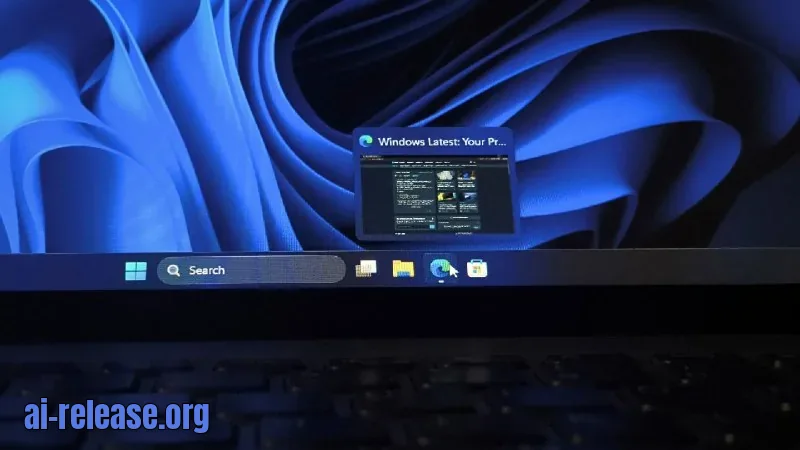
⚡ The gist in 5 seconds - Microsoft is testing a "Show taskbar previews as" setting: it replaces the taskbar's pop-up window thumbnails with a compact list of window titles. - The feature is hidden in the Windows Insider Experimental channel and is available in test build Build 26340.9596. - The same build also adds a Mobile devices tile to Quick Settings — for managing Do Not Disturb, volume, and finding your phone by sound. ### 🔍 What was found In the fresh Windows 11 test build 26340.9596, a "Show taskbar previews as" setting was spotted under Settings > Personalization > Taskbar. It sits between the "Combine taskbar buttons and hide labels" and "Show smaller app icons" options. The dropdown offers two modes: Thumbnail and List. Thumbnail is the default, and when List is selected, hovering over an app icon shows a narrow strip with the icon and window title — no live thumbnail. The author tested this on the winver dialog: in list mode, "About Windows" appears, while in thumbnail mode you get the usual preview with a title. The list saves space when many windows of the same app are open and hides window contents during screen sharing. A few lines above, a toggle also appeared for AI assistants, allowing them to see open apps. The author notes that they regularly keep many windows open, so this option interested them primarily for that reason. The second feature is the Mobile devices tile in Quick Settings (the Win + A panel). After linking an Android phone, the tile shows its name, e.g. "Gareth's A26", and an arrow opens a page listing devices with a "More mobile device settings" link. Selecting the phone reveals three buttons: Do Not Disturb, Volume, and Play sound, plus an On toggle and a shortcut icon; at the bottom of the page there's a plus button for adding a device. In the current preview, you can enable Do Not Disturb, control ringtone volume, and play a sound to find a lost phone — all without opening Phone Link first. If no phone is linked, the tile shows "Mobile devices" and the page shows "No mobile devices". ### 💡 Why it matters A list of titles instead of thumbnails frees up space and makes it easier to find the right window when many windows of one app are open. It also hides window contents during screen sharing — a title reveals less than a live preview. The Mobile devices tile in Quick Settings gives quick access to Do Not Disturb, volume, and finding your phone by sound: all of this can be done in a couple of clicks without opening Phone Link. Phone Link itself already offers these features, but you have to open the app first. ### 🧩 Context A list of titles instead of thumbnails is a trick from Windows XP, where clicking a grouped taskbar button expanded a menu with all of the program's windows. Live thumbnails only appeared in Windows Vista with Aero. Windows 7 used the list as a fallback when there were many windows and in simplified themes, and power users could turn it...
🤖 AI summary
- Date: 2026-10-07
- Source: www.windowslatest.com
- Tags: Windows, панель, Android, Quick
- Key facts:
- ⚡ The gist in 5 seconds - Microsoft is testing a "Show taskbar previews as" setting: it replaces the taskbar's pop-up window thumbnails with a compact list of window titles.
- - The feature is hidden in the Windows Insider Experimental channel and is available in test build Build 26340.9596.
- - The same build also adds a Mobile devices tile to Quick Settings — for managing Do Not Disturb, volume, and finding your phone by sound.
- 🔍 What was found In the fresh Windows 11 test build 26340.9596, a "Show taskbar previews as" setting was spotted under Settings > Personalization > Taskbar.
- It sits between the "Combine taskbar buttons and hide labels" and "Show smaller app icons" options.
- The dropdown offers two modes: Thumbnail and List.
- Thumbnail is the default, and when List is selected, hovering over an app icon shows a narrow strip with the icon and window title — no live thumbnail.
- The author tested this on the winver dialog: in list mode, "About Windows" appears, while in thumbnail mode you get the usual preview with a title.
WindowsпанельAndroidQuick
Read the guide on this topic
← PreviousOpenAI Shares AI Progress in Mathematics: What's KnownNext →EmbeddingGemma 2: an open multimodal embedding model with 740 million parameters
Source: www.windowslatest.com · post in Telegram